My review of component one:
I feel I have developed my skills greatly in Photoshop by using techniques like burning and dodging and manipulation of levels and curves tools to bring out the tonal range in my images. My images have been good when photographing aspect of photography such as landscape tone and line, however when assessing my images for colour and documentary they lack focus and the compositions are significantly weaker. this means for the component 2 I will work on improving the elements behind colour and documentary photography, if applicable to my exam brief as well as change my photographic mind set and not only think about denotations but how to incorporate connotations into my work.
Thursday, 25 April 2019

Thursday, 28 February 2019


Thursday, 31 January 2019


Thursday, 17 January 2019
Composite Images
Compostite Images
AO1: Develop ideas through sustained and focused investigations informed by contextual and other sources, demonstrating analytical and critical understanding.

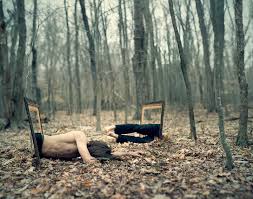
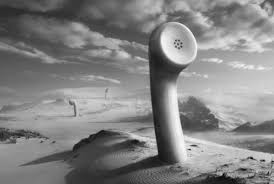
Digital composites: Is the process of digitally assembling multiple images to make a final image for print.


AO1: Develop ideas through sustained and focused investigations informed by contextual and other sources, demonstrating analytical and critical understanding.
(AO:1. You must ensure that several of the visual ideas/inspirations within the image bank are pursued. )
Image bank:
Digital composites: Is the process of digitally assembling multiple images to make a final image for print.
Research:
Jerry Uelsmann
The image below denotes a rock with a doorway in, Uelsmann has made this a composite by imposing the image of a doorway with stairs from a different photographic medium and has then pasted that on a rock which doesn't have the depth to hold a staircase. the tail of rocks lead you to the main feature stone of this black and white photo print.
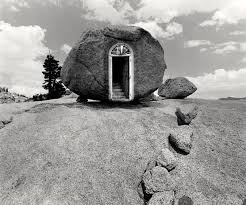 The image connote the idea that even places or situation that may not see to have a way out such as the end of a rock even that has a doorway.
AO2: Explore and select appropriate resources, media, materials, techniques and processes, reviewing and refining ideas as work develops.
 Editing the image 1:
When editing the first image I began by using the ruler setting to divide the canvas 4 equal quarters. My intentions of this edit was to create a mirrored image along with a an ambiguous centre. The mirror effect was achieved by cutting and pasting the same photo in each quadrant with a mirror the at each quadrant. this effect creates an illusion of a never ending hole much like the point of no return where humanity has lost its control and affection for nature and how it will ultimately disappear.
the editing process for this image was fairly simple however the overall effect is exaggerated because of the black abyss in the centre of the image. Layer mask where created so that if any mishaps occurred the original images could be salvaged and retouched again if necessary.


When editing the first image I began by using the ruler setting to divide the canvas 4 equal quarters. My intentions of this edit was to create a mirrored image along with a an ambiguous centre. The mirror effect was achieved by cutting and pasting the same photo in each quadrant with a mirror the at each quadrant. this effect creates an illusion of a never ending hole much like the point of no return where humanity has lost its control and affection for nature and how it will ultimately disappear.
the editing process for this image was fairly simple however the overall effect is exaggerated because of the black abyss in the centre of the image. Layer mask where created so that if any mishaps occurred the original images could be salvaged and retouched again if necessary.


Tuesday, 8 January 2019


Subscribe to:
Comments (Atom)